Redis는 데이터를 메모리에 저장하기 때문에 파일 시스템에 데이터를 저장하는 전통적인 데이터베이스보다 빠르게 원하는 데이터를 찾을 수 있다. 대신, 데이터를 저장할 수 있는 데이터 양은 전통적인 데이터베이스도보다 훨씬 적다. 따라서 Redis를 사용한다면, 메모리를 효율적으로 사용하는게 중요하다.
이번글을 통해 Redis에서 제공하는 Memory관련 설정과 Eviction 전략을 정리하겠다.
Redis에서 지원하는 Eviction 전략
Redis에서 메모리 관련해 제공해주는 옵션은 크게 maxmeory와 maxmemory-policy가 있다.
maxmemory
The maxmemory configuration directive specifies the maximum amount of memory to use for the cache data.
maxmemory 설정을 0으로하면 메모리 사용량에 제한을 두지 않는다.
(64비트 시스템에서는 제한을 두지 않지만, 32비트 시스템에서는 암묵적으로 3GB의 제한이 있다.)
당연히 설정을 0으로 하더라도 메모리를 과하게 사용하면 swap이 발생해 성능이 저하된다.
maxmemory-policy
Use the maxmemory-policy configuration directive to select the eviction policy you want to use when the limit set by maxmemory is reached.
The following policies are available:
noeviction: Keys are not evicted but the server will return an error when you try to execute commands that cache new data. If your database uses replication then this condition only applies to the primary database. Note that commands that only read existing data still work as normal.
allkeys-lru: Evict the least recently used (LRU) keys.
allkeys-lfu: Evict the least frequently used (LFU) keys.
allkeys-random: Evict keys at random.
volatile-lru: Evict the least recently used keys that have the expire field set to true.
volatile-lfu: Evict the least frequently used keys that have the expire field set to true.
volatile-random: Evict keys at random only if they have the expire field set to true.
volatile-ttl: Evict keys with the expire field set to true that have the shortest remaining time-to-live (TTL) value.
메모리 사용량이 maxmemory에 설정된 사용량을 넘어섰을때, 어떻게 동작할지에 대한 설정이다. 서비스가 Redis를 사용하는 패턴에 맞게 설정하는게 매우 중요하다.
Ref
- https://redis.io/docs/latest/develop/reference/eviction/
- https://redis.io/blog/cache-eviction-strategies/
Redis는 위와 같이 여러 메모리 Eviction 전략을 지원해 메모리를 효과적으로 사용할 수 있게 도와준다.
그럼 각 Eviction들이 실제로 어떻게 동작할지 알아보겠다.
동작 원리
LRU 동작 방식
LRU는 Least Recently Used의 약어로, 안 사용한지 가장 오래된 데이터를 메모리에서 제거하는 전략이다.
LRU 전략을 사용하면 Key 생성시 lru(Least Recently Used) time이 같이 저장된다.

lru : Redis의 내부 LRU 클럭 값.
lru_seconds_idle : 마지막으로 읽히거나 쓰인 시점부터 경과한 초.
(DEBUG OBJECT : 특정 key의 내부 정보를 확인할 수 있는 명령어)
Key에 가장 최근에 접근된 시간을 저장해두고, 실제 Memory Eviction이 발생하는 순간 그 값을 보고 LRU 값이 가장 과거의 데이터를 메모리에서 제거한다.
이때, 모든 키를 탐색하지 않고 maxmemory-samples에 설정된 갯수의 key를 램덤으로 뽑아 LRU 시간이 가장 오래된 Key를 삭제한다.
하지만 3.0 이후로는 좋은 후보들을 pool에 담아두고 해당 Key들을 대상으로 LRU 로직을 수행함으로써 실제로 가장 오래된 데이터를 삭제할 수 있도록 개선했다.
The Redis LRU algorithm uses an approximation of the least recently used keys rather than calculating them exactly. It samples a small number of keys at random and then evicts the ones with the longest time since last access.
From Redis 3.0 onwards, the algorithm also tracks a pool of good candidates for eviction. This improves the performance of the algorithm, making it a close approximation to a true LRU algorithm.
ref : https://redis.io/docs/latest/develop/reference/eviction/#apx-lru
3.0 이후로 생긴 pool of good candidates는 pool에 오래된 key들을 저장해둔다. 덕분에 random 방식으로 key를 선택해서 LRU 로직을 수행하는 것과 비교하면, 더 효율적으로 오래된 Key들이 제거된다.
(자세한 코드는 redis 코드의 evict.c 파일의 evictionPoolPopulate 로직을 확인해보면 된다.)
LFU 동작 방식
LFU는 Least Frequently Used의 약어로, 가장 접근이 적은 데이터를 사제하는 전략이다.
LFU 정책을 사용하면 Key마다, 몇번 접근되었는지 확인할 수 있는 Counter 값이 같이 저장된다.
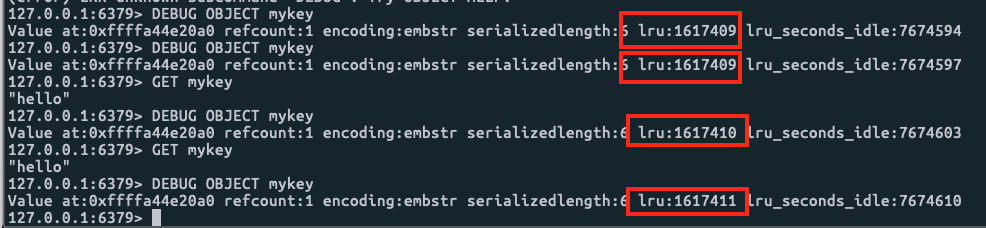
lru : key에 몇번 접근했는 알 수 있는 카운터.
Redis는 메모리를 아끼기 위해, LFU 카운터를 위한 필드를 새로 만들지 않고, maxmemory-policy에 따라 lru 필드가, 최근 접근한 시간이 되기도 하고, Key에 접근한 카운터가 되기도 한다.
LRU time (relative to global lru_clock) or LFU data (least significant 8 bits frequency and most significant 16 bits access time)
(redis/src/server.h redisObject)
Counter를 그냥 표현하면, 너무 많은 메모리가 필요하기 때문에 Morris counter를 이용해 8비트의 저장 공간으로만 카운터를 표시한다.
(Morris counter는 확률적인 방법으로 적은 메모리를 이용해 큰 수의 근사치를 알려주는 방법이다.)
추가로, decay라는 개념을 적용해 특정 기간마다, count값을 감소시켜준다. 이는 특정 기간에는 많이 조회했으나, 지금은 조회하지 않는 데이터들이 메모리에서 삭제될 수 있게 도와준다.
위 방법들도, 적은 메모리 공간을 사용해 key에 몇번 접근했는지 근사값을 저장해둔다. 그리고 메모리 삭제가 필요한 시점에 LRU와 동일하게 maxmemory-samples 설정값 만큼 key 갯수를 랜덤하게 선택한뒤 가장 count가 작은 key를 제거한다.
ref
- https://redis.io/docs/latest/develop/reference/eviction/#lfu-eviction
- https://en.wikipedia.org/wiki/Approximate_counting_algorithm
Redis에서는 Expire Key 삭제 원리
Redis는 Key를 특정 시간이 지난 뒤 제거할 수 있는 옵션을 제공한다. 해당 키들은 어떻게 시간이 지나면 삭제될까?
2가지 방법이 존재한다.
1. passive way
Client가 Key를 조회하는 시점에 time out 여부를 판단해, time out이면 제거한다.
2. active way
주기적으로 expire key중 몇 가지 key를 램덤하게 뽑아서, expire이 필요하면 메모리에서 제거한다.
How Redis expires keys
Redis keys are expired in two ways: a passive way and an active way.
A key is passively expired when a client tries to access it and the key is timed out.
However, this is not enough as there are expired keys that will never be accessed again. These keys should be expired anyway, so periodically, Redis tests a few keys at random amongst the set of keys with an expiration. All the keys that are already expired are deleted from the keyspace.
ref
- https://redis.io/docs/latest/commands/expire/#how-redis-expires-keys
이번 글을 통해 Redis 메모리 관리를 위한 설정들과 동작원리를 정리했다.
각자 서비스에 맞는 설정들을 사용해 Redis의 효과를 최대한으로 사용하길 바란다.
'Infrastructure' 카테고리의 다른 글
| 서버 개발자가 알면 좋은 MySQL Tips (0) | 2025.08.31 |
|---|---|
| Redis Operate (5) | 2025.08.07 |
| Redis 성능의 비밀: 메모리부터 싱글 스레드까지 파헤치기 (0) | 2025.05.21 |
| K8S CPU Requests와 Limits 의미 (0) | 2024.03.31 |
| Redis Pub/Sub과 Kafka 비교 (0) | 2024.02.17 |